Keyboard
GDevelop gives access to all inputs made on the keyboard. This includes conditions to check if a key was pressed or released.
Note
Keyboard conditions do not work with the on-screen keyboard on touch devices. When making a game for mobile or touchscreen devices, use the mouse/touch conditions instead.
Any key pressed
For this condition, the corresponding action/s will be performed if any key on the keyboard is pressed.
Any key released
This condition is true on the frame where any key is released.
Key pressed
Whenever the key selected while setting this condition is held down, the corresponding actions are performed. This stays true for as long as the key is held.
Key just pressed
This condition is true only on the frame where the key was first pressed down. Use it instead of "Key pressed" when an action should happen once per key press (for example, jumping or firing a shot) rather than continuously while the key is held.
Key released
This condition is true on the frame where the selected key is released.
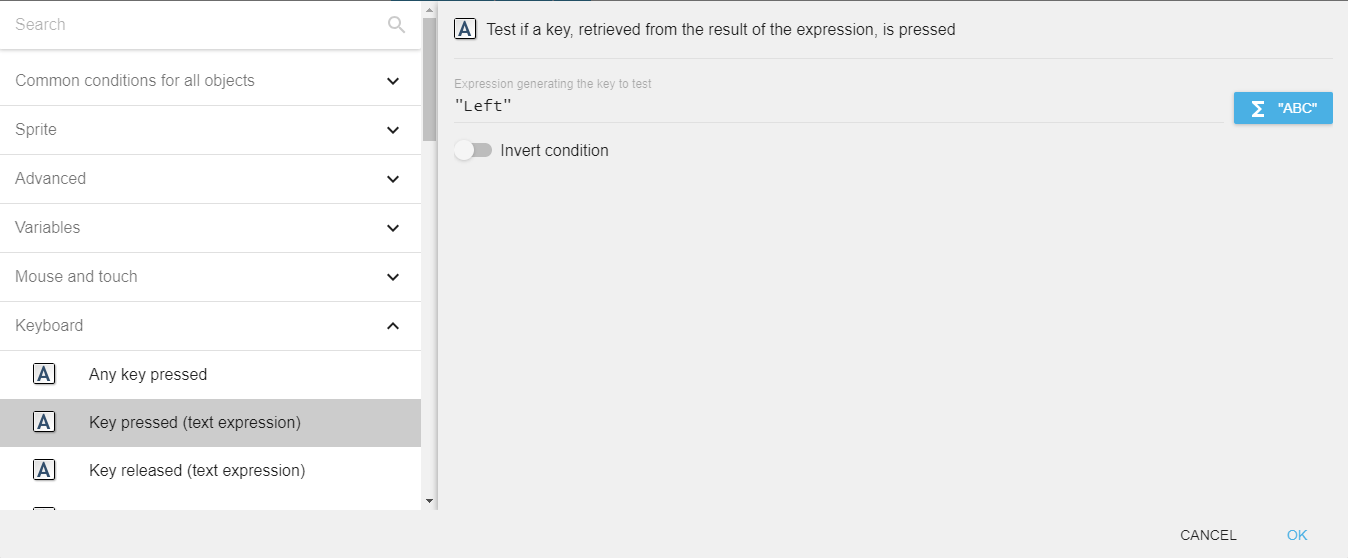
These conditions let you pick the key from a list, but you can also enter the key name as a text expression (for example to use a variable to remap controls). When typing the key name directly, make sure it is surrounded by quotes.
Danger
Make sure that the key name is surrounded by quotes.
Key names
When using a key condition with a text expression, or when reading the value returned by the "Last pressed key" expression, the key name must be one of the following:
- Letters:
atoz(always lowercase, regardless of the Shift key). - Digits (top row):
Num0toNum9. - Numpad digits:
Numpad0toNumpad9. - Arrow keys:
Left,Up,Right,Down(and the numpad versionsNumpadLeft,NumpadUp,NumpadRight,NumpadDown). - Modifiers:
LShift,RShift,LControl,RControl,LAlt,RAlt,LSystem,RSystem(the left/right Windows or Command key),Menu. - Function keys:
F1toF12. - Editing & navigation:
Space,Back(Backspace),Tab,Return(Enter),Escape,Delete,Insert,Home,End,PageUp,PageDown,Pause. - Numpad keys:
NumpadReturn,NumpadHome,NumpadEnd,NumpadPageUp,NumpadPageDown,NumpadAdd,NumpadSubtract,NumpadMultiply,NumpadDivide. - Symbols:
SemiColon,Comma,Period,Quote,Slash,BackSlash,Equal,Dash,LBracket,RBracket,Tilde,Add,Subtract,Multiply,Divide.
Last pressed key
The "Last pressed key" expression returns the name of the most recently pressed key as a string (see the key names above). For example, if the last key pressed is the left arrow key, the expression returns "Left". This is useful to build a "press any key to continue" prompt or to let players remap their controls.
Reference
All actions, conditions and expressions are listed in the keyboard reference page.